Contributed by: TriciaD, FreeTaxUSA Agent, Tax Pro

Filing your federal income tax return can be stressful, especially if your return has been rejected. One reason for rejection is Form 1095-A (Health Insurance Marketplace Statement) wasn’t included with a tax return. This article explains why the IRS requires Form 1095-A, why your return was rejected for a missing form, and the steps you take to resolve the issue and successfully file your taxes.
What is Form 1095-A?
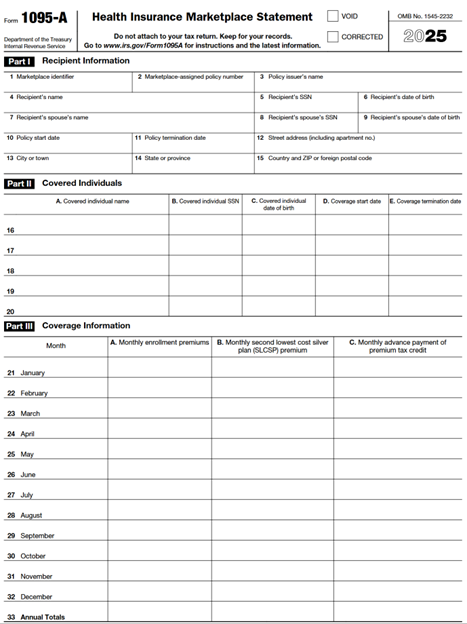
Form 1095-A is a tax document provided to individuals who purchased health insurance coverage through the Health Insurance Marketplace or your state’s Marketplace exchange. This form details the months you and your family members were covered, the amount of premiums paid out on your behalf, and any advance premium tax credit (APTC) you received throughout the year. Information on Form 1095-A is necessary for completing Form 8962, Premium Tax Credit (PTC), which reconciles the above information and is required to be included with your tax return if you received premium assistance.
Form 1095-A
Form 8962

Why was my return rejected for a missing 1095-A?
The IRS uses cross-check systems to match tax returns with information statements, such as Form 1095-A. If you or anyone claimed on your tax return received advance premium tax credit to help pay for Marketplace coverage, the IRS requires Form 8962 reporting information from Form 1095-A to be included with your tax return. If this information isn’t included with your tax return, the IRS will reject your e-filed return or send you a notice if you filed by mail.
Common reasons for rejection include:
- You indicated Marketplace coverage on your return but didn’t include Form 8962, which requires information from Form 1095-A.
- The IRS received their copy of your 1095-A, but you didn’t report it.
- There was a data entry error, such as an incorrect Social Security Number or inaccurate coverage details.
Common situations that cause confusion
Situation 1: If a Marketplace policy covered at least one individual in your tax family (people included on your tax return) and at least one individual outside of your tax family, the premiums need to be allocated between the two families' tax returns. This may include the following:
- You were divorced or legally separated during the tax year.
- A parent enrolls a child in a Marketplace health plan, but the other parent claims the child as a dependent on their tax return.
- You have an adult child (age 26 or younger) who is enrolled in your Marketplace health plan, but isn’t a dependent on your tax return.
- You’re an adult child who’s enrolled in your parent's Marketplace health plan, but you’re filing your own tax return.
Solution in FreeTaxUSA:
- Follow menu path: Deductions/Credits > Health Insurance > Marketplace Health Insurance (1095-A). Enter the information on the following screens as it applies to you.
- On the Marketplace Statement Information (Form 1095-A) page, select Yes when asked if you need to allocate your premiums between two different tax returns.
- Continue entering information as you proceed through the screens.
- On the Enter your health insurance info from Form 1095-A screen, enter the SSN of the other person and months the policy was shared.
- Enter the percentages that were mutually agreed upon with the person who shared the plan.
Situation 2: The Marketplace wasn’t notified of changes during the tax year. You may need to adjust your premium for the Second Lowest Cost Silver Plan (SLCSP) if any of the following apply and the Marketplace wasn’t notified:
- You added someone to your health insurance during the year (like a newborn).
- You dropped someone from your health insurance during the year.
- Someone in your household gains or loses employer health insurance or other health insurance coverage eligibility.
- You claimed someone on your tax return that you didn’t tell the Marketplace about.
- You told the Marketplace you were going to claim someone on your tax return, but that person isn’t on your return.
- A person enrolled in the coverage passed away but you don’t remove the individual from the policy.
- You moved during the year.
- You were enrolled in both Medicaid and a qualified Marketplace health plan with advance Premium Tax Credit payments, and you didn’t tell the Marketplace you qualified for Medicaid.
Solution in FreeTaxUSA:
- Follow menu path: Deductions/Credits > Health Insurance > Marketplace Health Insurance (1095-A). Enter the information on the following screens as it applies to you.
- On the Marketplace Statement Information (Form 1095-A) page select No when asked if Form 1095-A shows the same amounts in columns A, B, and C for each month.
- Make the necessary adjustments for any scenario in which coverage changes and the Marketplace wasn’t notified. View Publication 974 ( page 27) for instructions on how to adjust the premium for SLCSP.
Example: Allocating Marketplace premiums between two tax returns:
Situation 1: Let’s say Jane and Mike are married and have a Marketplace health insurance policy that covers them from January through July. Advance premium tax credit is paid for their coverage. Jane and Mike divorce in October. As a result, they each file a separate tax return for the year, using the Single filing status. The Marketplace provides Form 1095-A to Jane, and she gives a copy to Mike. Since the Marketplace policy covered individuals in Jane's tax family (Jane) and Mike's tax family (Mike), the IRS requires that the policy amounts be allocated between Jane’s and Mike’s tax returns for the months they were married:
- Jane and Mike agree to split the total annual premiums 50/50. Jane will report 50% of the premiums, and her share of the advance premium tax credit on her tax return. Mike will report the remaining 50% and his coverage months on his own tax return.
- Jane enters the following information in FreeTaxUSA:
- On the Marketplace Statement Information (Form 1095-A) page, she selects Yes when asked if premiums should be allocated.
- She enters Mike’s SSN and the months the policy was shared.
- She enters the agreed-upon allocation percentage (50%).
- Mike follows the same steps on his tax return, entering Jane’s SSN, the shared months, and his 50% share.
This process ensures both tax returns accurately reflect the shared Marketplace coverage and premium allocations, avoiding IRS rejection due to mismatched information.
Example: SLCSP premium adjustment when Marketplace wasn’t notified:
Situation 2: Suppose Maria purchased health insurance through the Marketplace. When her son, Alex, was born in July, she contacted her insurance provider to add Alex to the policy but forgot to report the change in household size to the Marketplace. As a result, her Form 1095-A only reflects premium amounts for Maria's coverage for the entire year.
- Maria claims Alex as a dependent on her tax return.
- The Marketplace wasn’t updated, so the SLCSP premium is incorrect for the months Alex was covered.
Maria uses FreeTaxUSA to adjust the SLCSP premium for July through December to reflect Alex’s coverage.
- On the Marketplace Statement Information (Form 1095-A) page, she selects Yes when asked if there were changes not reported to the Marketplace.
- She enters the months Alex was covered and updates the premium amounts accordingly.
By properly adjusting the premium amounts and coverage months, Maria’s return will match IRS records and avoid rejection.
What steps should I take if my return is rejected by the IRS?
If your return was rejected for a missing Form 1095-A, don’t panic. Follow these steps to resolve the issue:
- Find your Form 1095-A: The Marketplace mails Form 1095-A to you by early February. You can also download it from your HealthCare.gov account or your state’s Marketplace website. Log in, look for “Tax Forms,” and download the correct year’s document.
- Review the form for accuracy: Check the coverage months, household members, and premium amounts. If you notice any mistakes, contact the Marketplace for a corrected form.
- Update your tax return: Use the information from Form 1095-A to complete or correct Form 8962. FreeTaxUSA software will prompt you to enter the information. If you’re working with a tax professional, provide them with the form.
- Resubmit your return: After making the necessary corrections, e-file your return again. If you continue to experience issues, you may need to file by mail with the corrected forms attached.
- Respond quickly to IRS notices: If you receive a notice or letter from the IRS requesting additional information, respond as soon as possible to avoid delays in processing your return or receiving your refund.
Steps for entering Form 1095-A in FreeTaxUSA
If the IRS rejects your e-filed return from a FreeTaxUSA account, you’ll receive a rejection notice that looks like this:

Additional instructions will follow explaining how to correct the information and re-submit your return. The following are steps to take to enter the necessary information to include Form 8962 with your tax return:
- Follow menu path: Deductions/Credits > Health Insurance > Marketplace Health Insurance (1095-A).
- Continue through the screens entering information from your Form 1095-A.
- If Marketplace Health Insurance information was included with your first submission, review the entries for accuracy.
- Resubmit your return.
Frequently asked questions
- What if I never received a 1095-A? If you believe you should have received Form 1095-A but didn’t, contact the Health Insurance Marketplace where you enrolled. You can also access your form online through your Marketplace account.
- What if no one had Marketplace health insurance or I’m being claimed as a dependent on someone else’s return? Our software supports including a statement and e-filing after this type of rejection. Enter an explanation of why Form 8962 isn’t included with your return and e-file your return again.
- The information has been entered correctly, and the IRS isn’t accepting my return. What do I do? You’ll need to file your return by mail.
- Do I need to include Forms 1095-B or 1095-C? No. Forms 1095-B and 1095-C are for informational purposes only and aren’t required to be filed with your tax return. Only 1095-A information is needed to complete Form 8962.
Conclusion
A rejected tax return can be frustrating, but missing Form 1095-A is fixable. By obtaining the form, reviewing its accuracy, updating your return, and resubmitting your information, you can resolve the rejection. If in doubt, seek assistance from a tax professional, contact FreeTaxUSA Customer Support, or reach out to your Marketplace for help.